Using AI from Python
1 / 10Using AI from Python
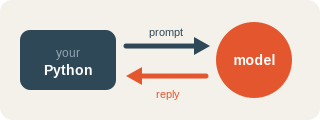
You do not have to build an AI model to use one. From Python, a language model is a function you call: text goes in, text comes out.
The pattern is always the same: ask, shape the answer, add your data, add your functions, and check the result.
In this topic
Why AI speaks Python
Python is the common language of the AI world. Whatever is new in AI can usually be used from Python first.
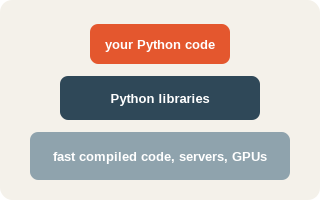
NumPy and pandas for data, PyTorch for building models. Years of AI work are one pip install away.
You write a few readable lines. The heavy calculation runs underneath, in fast compiled code or on a remote server.
Companies that offer AI models publish an official Python package for calling them.
Talk to a model
Like sending a letter and getting a reply. Your program sends a prompt over the internet; the model's answer comes back as text.
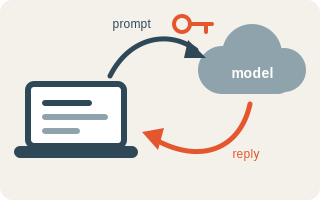
The shape is the same with every provider; only the names differ.
reply = ask("Explain a for loop in one sentence")
print(reply)
Here ask stands for the provider's own function.
Text is counted in tokens, pieces of words. You pay for the tokens you send and the tokens you get back, so short prompts are cheaper.
Each call starts fresh. For a conversation, your program keeps the earlier messages in a list and sends them again.
Keep the API key safe
An API key is like a house key: whoever holds it gets in, and the bill goes to you. So it never lies around in the open. Where you keep it depends on where the program runs.
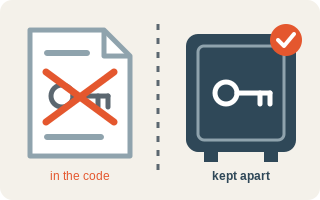
Your password for the service. It tells the provider who is asking, and who pays.
Code gets pushed to Git, shared and pasted into chats, and the key travels with it. The code only says where to find the key.
The simplest way. Set the key in your terminal or system settings; the program reads it at start.
import os
key = os.environ["API_KEY"]
A small file in the project folder with a line API_KEY=.... The python-dotenv package loads it:
from dotenv import load_dotenv
load_dotenv()
Add .env to .gitignore. Commit a .env.example that lists the names without the values.
The password store of Windows, macOS or Linux keeps the key encrypted, with no plain-text file at all. The keyring package reads it:
keyring.get_password("my-app", "api_key")
For programs on a server, in the cloud or in CI. The key is stored in the platform's secret settings and handed to the program when it starts. Nobody on the team needs to see it.
- learning or a quick script: environment variable or
.env - a tool you keep using on your own computer: system keychain
- anything deployed or shared with a team: secrets manager
- one key per project, so you can cancel one without breaking the others
- a spending limit in the provider's settings
Cancel it at the provider at once and create a new one. Deleting the line is not enough: Git history still remembers it.
Shape the answer
Like ordering in a restaurant: the clearer the order, the closer the dish is to what you wanted.
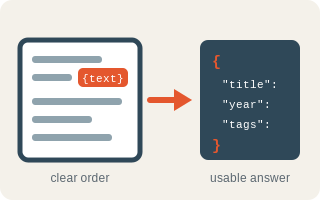
One template, many questions.
prompt = f"Translate into {language}: {text}"
A standing order sent with every call, such as "Answer in one short paragraph for a beginner."
One sample of the answer you want often works better than a long description of it.
Tell the model to answer as JSON, then turn the text into a dictionary your program can use.
data = json.loads(reply)
print(data["title"])
Give it your data
An open-book exam. The model has never seen your files, so you put the right pages on the desk next to the question.

notes = open("notes.txt").read()
prompt = f"Summarise these notes:\n{notes}"
A model can read only a limited number of tokens at once, its context window. A whole archive will not fit.
With many documents, your program first finds the few passages that match the question and sends only those. This pattern is known as RAG.
The text leaves your computer. Do not send passwords, or other people's personal data, without a good reason and permission.
Let it use your functions
The model is a brain without hands. Your Python functions are the hands: it asks, your program does.
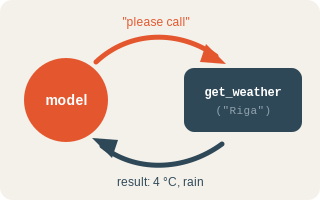
With the prompt, you send a list of functions the model may ask for: each one's name, what it does, and its parameters.
Instead of an answer, it can reply: "call get_weather with city="Riga"".
The model never runs anything itself. Your program calls the function and sends the result back, and the model writes the final answer.
Ask, call a function, send the result, ask again, in a loop until the task is done. That loop is the core of an AI agent.
The model can only ask for the functions you offer. Think twice before offering one that deletes, sends or pays.
AI as your coding partner
A fast, well-read colleague who is sometimes wrong. Great for a first draft; you stay the one who checks and decides.

Paste the error message and the code around it. Ask what it means before asking for a fix.
Describe the function you need in plain words and let the assistant write it.
If you cannot explain a line, ask about it. Code you do not understand is code you cannot repair.
A model can invent a function that does not exist and sound sure about it. Sounding sure is not proof.
Run the code and run the tests. A passing test is better evidence than any explanation.
Try it
Reading is not doing. Three small tasks. The first two need no account and cost nothing.

Paste the totals function from the expense tracker into an AI assistant and ask it to explain every line. Check each sentence against what you know. Is anything wrong or vague?
Put a made-up key into a .env file and load it in Python. Print only its length, never the key itself. Check with git status that .env is ignored.
Pick one AI provider and follow its quickstart to send a prompt from Python. Then build the prompt with an f-string, ask for JSON, and turn the reply into a dictionary.