History: inspecting, undoing and rewriting
1 / 6History: inspecting, undoing and rewriting
Three things you do with history: look at it, take something back, and tidy it up.

In this topic
Inspecting
Read the history without changing anything. All four commands are safe.

The list of commits, newest first.
git log --onelinegives one line per commitgit log --oneline --graphalso draws the branches
What exactly changed, line by line.
git diffshows changes not yet stagedgit diff --stagedshows what the next commit will contain
git show a1b2c3d opens one commit: its author, date, message and changes.
git blame notes.txt shows, for every line, who last changed it and in which commit.
Use it to find the commit that explains a line, then git show that commit.

Undoing
Take something back. Which command depends on how far the change has got.

For changes not yet committed.
git restore notes.txtthrows away your edits to the file. They cannot be recovered.git restore --staged notes.txttakes the file out of the staging area and keeps your edits
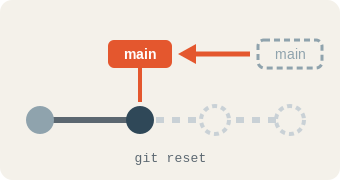
Slides the branch label back to an earlier commit.
git reset --soft HEAD~1keeps the changes stagedgit reset HEAD~1keeps the changes in your filesgit reset --hard HEAD~1discards the changes
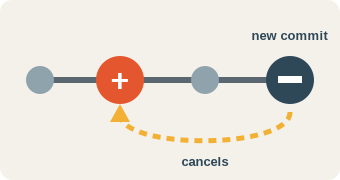
git revert a1b2c3d adds a new commit that cancels an old one. Nothing is removed from the history, so it is safe on shared branches.
Puts unfinished work in a drawer so your working directory is clean.
git stashputs it awaygit stash popbrings it backgit stash listshows what is in the drawer

Rewriting
Tidy up commits before you share them. Rewritten commits get new hashes.

Fixes the last commit: correct its message, or stage a forgotten file and fold it in.
git rebase main replays your commits on top of main. The history becomes one straight line, with no merge commit.
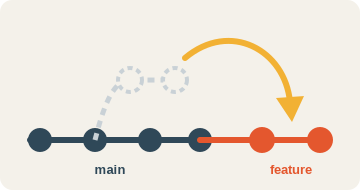
git rebase -i HEAD~3 lets you edit the last three commits: reorder them, reword them, or squash several into one.
Stay safe
One rule and one safety net.

Do not rewrite commits you have already pushed. Others may have built on them. This applies to amend, rebase and reset.
git revert only adds a commit, so it never breaks anyone else's history.
git reflog lists where HEAD has been. Commits that seem lost after a reset or rebase can usually be found there.