Functions, modules, classes and objects
1 / 9Functions, modules, classes and objects
Four ways to organise code so that it stays small in your head.
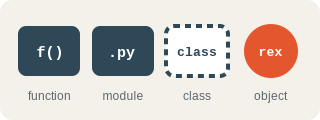
A function names a job. A module is a file of functions. A class is a blueprint, and objects are the things built from it.
In this topic
Functions
A kitchen machine: build it once, then press the button whenever you need the job done.
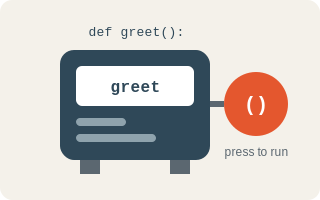
def greet():
    print("Hello!")
This only builds the machine. Nothing runs yet.
greet() runs the function. The brackets are the button.
When the same lines appear twice, move them into a function. A fix then needs to be made in one place only.
send_invoice(customer) tells the reader what happens, without reading how.
Inputs and outputs
Ingredients in, dish out. Parameters carry values into the function; return hands the result back.
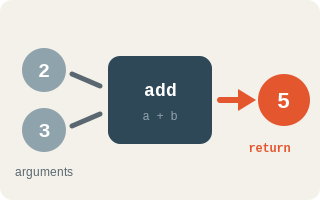
def add(a, b):
    return a + b
add(2, 3) puts 2 into a and 3 into b.
Ends the function and sends a value back to the caller.
total = add(2, 3) makes total equal to 5.
print only shows a value on the screen. return gives it to the program. A function without return gives back None.
def greet(name, greeting="Hello"):
Leave the second argument out and "Hello" is used.
greet(name="Ada", greeting="Hi")
Clearer to read, and the order no longer matters.
Scope
What happens in the kitchen stays in the kitchen. Names made inside a function live only while it runs.
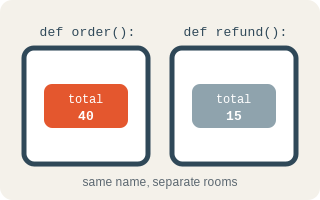
A variable created inside a function cannot be seen outside it, and is gone when the function ends.
Two functions can both use total. They do not disturb each other.
Give a function what it needs as arguments and take the result from return. Avoid reaching for variables outside it.
Modules
A shelf of machines you can borrow. A module is simply a .py file whose functions other files can use.
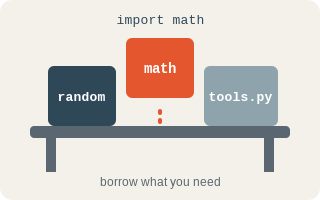
import math
print(math.sqrt(16))
Prints 4.0.
from math import sqrt takes one name, so you can write sqrt(16) directly.
Save functions in tools.py. In another file in the same folder, import tools and call tools.greet().
- the standard library, which comes with Python
- packages installed with
pip - your own files
if __name__ == "__main__":
    main()
This part runs only when the file is started directly, not when it is imported.
Classes
A blueprint: it describes what a kind of thing knows and what it can do. The blueprint itself is not the thing.
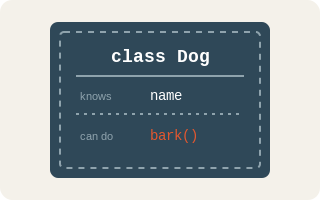
class Dog:
    def __init__(self, name):
        self.name = name

    def bark(self):
        print(f"{self.name} says woof")
The set-up step. It runs automatically each time a new object is made.
"This particular object." Through self, a method reaches the object's own data.
What the object knows: variables that belong to it, such as self.name.
What the object can do: functions written inside the class, such as bark.
Objects
The houses built from the blueprint. One class, as many objects as you like, each with its own data.
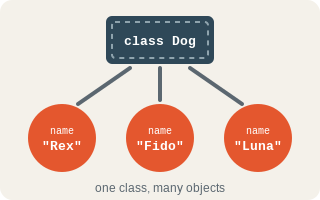
rex = Dog("Rex")
Calling the class like a function builds a new object.
rex.name reads an attribute. rex.bark() calls a method.
rex = Dog("Rex") and fido = Dog("Fido") share the class but keep separate names.
Strings and lists are objects too. "hello".upper() and fruits.append("fig") are method calls.
class Puppy(Dog): makes a new class that starts with everything Dog has, then adds or changes a little.
Try it
Reading is not doing. Three small tasks: type them yourself instead of copying, and run each one.
Write area(width, height) that returns the area of a rectangle. Call it twice with different numbers and print both results.
Move area into a file shapes.py. In a second file, import it and use it. Both files must be in the same folder.
Write a class Counter with an attribute count that starts at 0 and a method add_one(). Make two counters, call add_one() three times on one of them, and print both counts.