First steps and variables
1 / 9First steps and variables
From nothing installed to a program that remembers things.
Four steps: install Python, talk to it at the prompt, save a program in a file, and give your values names.
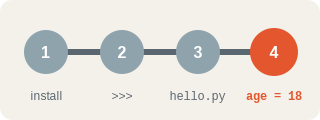
In this topic
Install Python
One download, done once per computer. After that, Python is a command you can type in any terminal.
The official installer is free. Take the latest version offered for your system.
python --version prints the installed version.
On macOS and Linux the command is often python3.
VS Code and PyCharm are popular. IDLE is a simple editor that comes with Python itself.
The >>> prompt
A conversation: you say one line, Python answers at once. The best place to try things out.
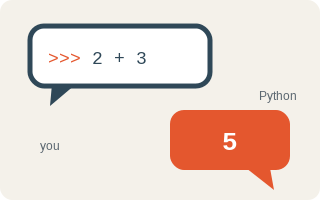
Type python in a terminal. The >>> means Python is waiting for you.
>>> 2 + 3
5
>>> 10 / 4
2.5
Lines typed at the prompt are gone when you close it. For anything you want to keep, use a file.
exit() ends the conversation.
Your first program
A program is a script for a play: lines saved in a file, performed from top to bottom, the same way every time.
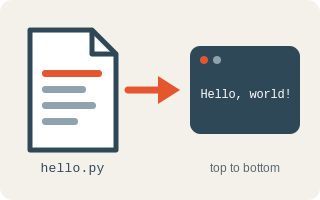
A plain text file whose name ends in .py, for example hello.py.
python hello.py runs the file, line by line, from the top.
Shows something on the screen.
print("Hello, world!")
Asks a question and waits for the user to type an answer.
name = input("Your name? ")
Everything after # is a note for people. Python skips it.
# ask for the user's name
Variables
A variable is a name tag tied to a value. Say the name and Python hands you the value.
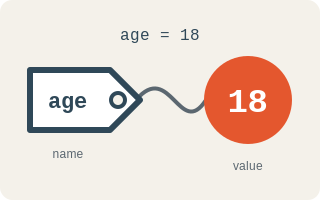
age = 18 ties the tag age to the value 18.
Read = as "is now", not as "equals".
age = 18
print(age + 1)
Prints 19.
age = 19 ties the same tag to a new value. The old value is simply let go.
After b = a, both names point at the same value. Nothing is copied. That is why a tag is a better picture than a box.
- letters, digits and
_, not starting with a digit Ageandageare different names- by habit: lowercase words joined by
_, such asfirst_name
Types of values
Every value has a type, and the type decides what you can do with it. Five types cover the first weeks.
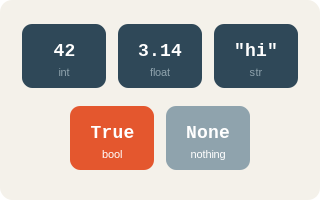
Whole numbers: 42, -7, 0.
Numbers with a decimal point: 3.14, 2.0.
Text, a string of characters, in quotes: "hello" or 'hello'.
Only two values: True and False. Mind the capital letter.
The value for "nothing here yet".
Ask Python what something is.
type(3.14) answers <class 'float'>.
Mix and convert
Text and numbers do not mix on their own. You convert one into the other, like changing money at a border.
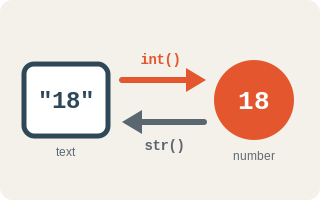
Type 18 and you get the string "18", not the number 18.
int("18") gives 18. float("2.5") gives 2.5.
age = int(input("Your age? "))
str(18) gives "18".
Put an f before the quotes and drop variables into the text with {}.
print(f"{name} is {age} years old")
"18" + 1 stops with a TypeError. The last line of an error message says what went wrong; read it first.
Try it
Reading is not doing. Three small tasks: type them yourself instead of copying, and run each one.
At the >>> prompt, let Python work out how many seconds a day has. Then how many a year has.
Write hello.py. It asks for your name and answers Hello, Ada! with the name you typed. Use input() and an f-string.
Ask for an age and print the age one year from now. Then run it again, type a word instead of a number, and read the last line of the error.